From Disaster to Recovery: How FlashArray and vVols Saved Business-critical Apps
See how a customer went from potential disaster to recovery after several business-critical vVol-based database VMs were deleted by misfiring automation

Originally published on Pure Storage Blog on August 6, 2025
Summary
When a customer encountered an issue with misfiring automation in their VMware environment, what might have been a disaster resulted in a happy ending thanks to a superpower of FlashArray: eradication delay.
Editor’s Note: vVols Uptake and EoL Announcements (Feb 2026)
Interestingly enough, we’ve seen an uptake in vVols since the first EoL announcements—and now we’re seeing VMware/Broadcom push out the EoL versions and dates. I’m a big fan of vVols and it would seem some of you VMware and Storage admins are as well. Keep up the good fight and continue with the messaging that we want vVols to stay.
Official retirement date has been modified and is now set for VCF/VVF 9.3.0. See Broadcom KB Article ID: 401070 for the most up-to-date information.
It started like many incidents do, not with malice, but in this instance, with misfiring automation. A customer running Pure Storage® FlashArray™ for their VMware environment experienced an unintended deletion of several vVol-based database VMs, each with a number of virtual disks.
Automation did its thing. The VMs vanished. Chaos ensued. Because these were vVol-based VMs, deleting them in vSphere also wipes out the underlying storage volumes on an “array,” config and data included… Ordinarily, this would be a disaster. But with Pure Storage, there’s still an option for a happy ending. For the moment, though, buckle up—it gets worse before it gets better.
The Hidden Trap: No Snapshots, No Backups
As we assessed the damage, the first thought was simple: “No problem—we’ll just use the Pure Storage vSphere Plugin to ‘undelete’ the vVol-based VMs.”
What makes this capability so effective is the tight integration between the plugin and the snapshot architecture of FlashArray. Snapshots are space-efficient, incur no performance penalty, and can be hardened against cyber threats or automation errors with SafeMode™. It’s a seamless, UI-driven “break glass” solution that every environment should have on standby.
But there were no VMs to “undelete.” Why? Despite how lightweight and powerful they are, the customer had chosen not to use snapshots—likely due to cost concerns. A decision that was about to come back to haunt them.
To make things worse, the deleted VMs were in a “transition state” and weren’t yet backed up. Panic was starting to set in.
Eradication Delay: A Superpower of FlashArray
Here’s where Pure Storage architecture quietly saved the day.
While the VMs were “destroyed,” they weren’t gone gone—or as we say, “eradicated.”
You might be thinking—how? The default eradication delay setting in FlashArray. When an object is deleted (such as vVols), it moves from “active” to “destroyed” to “eradicated.” If caught in the “destroyed” stage, recovery is just a few clicks away.
Thanks to the eradication delay setting, which is set to one day by default, the destroyed vVols were still lingering, awaiting permanent deletion. That 1-30 day grace period is often overlooked, but it’s a silent savior.

Figure 1: Understanding the FlashArray deletion process.
And so began the process of pulling volumes out of the eradication delay stage—one array at a time. Thanks to the intuitive interface of FlashArray, each recovery was straightforward. Still, with multiple arrays in play, across multiple locations, and the timer ticking down, we needed to get cracking.
The Reality: Recovered Volumes but Missing VMs
While we successfully recovered the data volumes—including the config vVols—the config vVols were empty. Without these, we had the parts that make the VM, but not the state that turns the parts into a whole.
Why? Because vVol VM deletion clears the config as part of the deletion process. So, vCenter’s VASA provider had no metadata to register a VM against.
The Long Road Back: Manual Recovery
Enter the multi-team relay race: storage, VMware, automation, and eventually backup.
The baton was handed to the automation team. Because these VMs were built via pipeline, we couldn’t just click-ops our way through a VM rebuild. We needed to:
- Recreate multiple blank vVol VMs.
- Maintain identical sizing and structure.
- Overwrite each of the new blank VMs’ data volumes—50+ volumes—with the recovered volumes.
Each volume had to be carefully mapped and aligned to the recreated VMs. This extra effort wasn’t due to any FlashArray limitation—it was the result of an upstream decision not to enable FlashArray-based snapshots, likely made under pressure to reduce costs—resulting in a manual recovery.
We get it. In large organizations, turning on snapshots isn’t always a technical decision—it’s often tied to procurement, policy, or competing priorities. But here’s the real cost:
- Multiple arrays
- Multiple locations
- Manual mapping of 50+ volumes
- Manual overwrite of 50+ volumes
- All while the application teams and business units are escalating for answers
This is where Pure Fusion™—our global management plane—really starts to shine. As customers grow their array footprint, Pure Fusion provides a single, unified UI to manage volumes, snapshots, and recovery workflows across multiple arrays and locations.
Even with the manual workflow, FlashArray delivered when it mattered. Data copy operations were lightning fast—multiple terabytes restored in seconds, with zero impact to performance or capacity thanks to its space-efficient architecture.
The (False) Backup Lifeline
As recovery efforts progressed, a test of the updated VM deployment pipeline encountered a hiccup. At this point, the teams began weighing their options: Continue triaging the revised automation pipeline and tackling the volume mapping exercise, or switch to restoring from backup—not quicker, but perhaps easier.
Unfortunately, as you might recall from earlier, the VMs were caught in a transitional state—and backups hadn’t yet been implemented.
So the team pressed on with the adjusted pipeline and the manual volume overwrite plan. FlashArray was now the only path to recovery, since there were:
- No snapshots
- No backup
- And no other storage vendor would have had volumes in a recoverable state
The Turning Point
This is when the VMware team came to the realization that if they’d had FlashArray snapshots enabled, they could have recovered these VMs in minutes right from the vSphere Console.
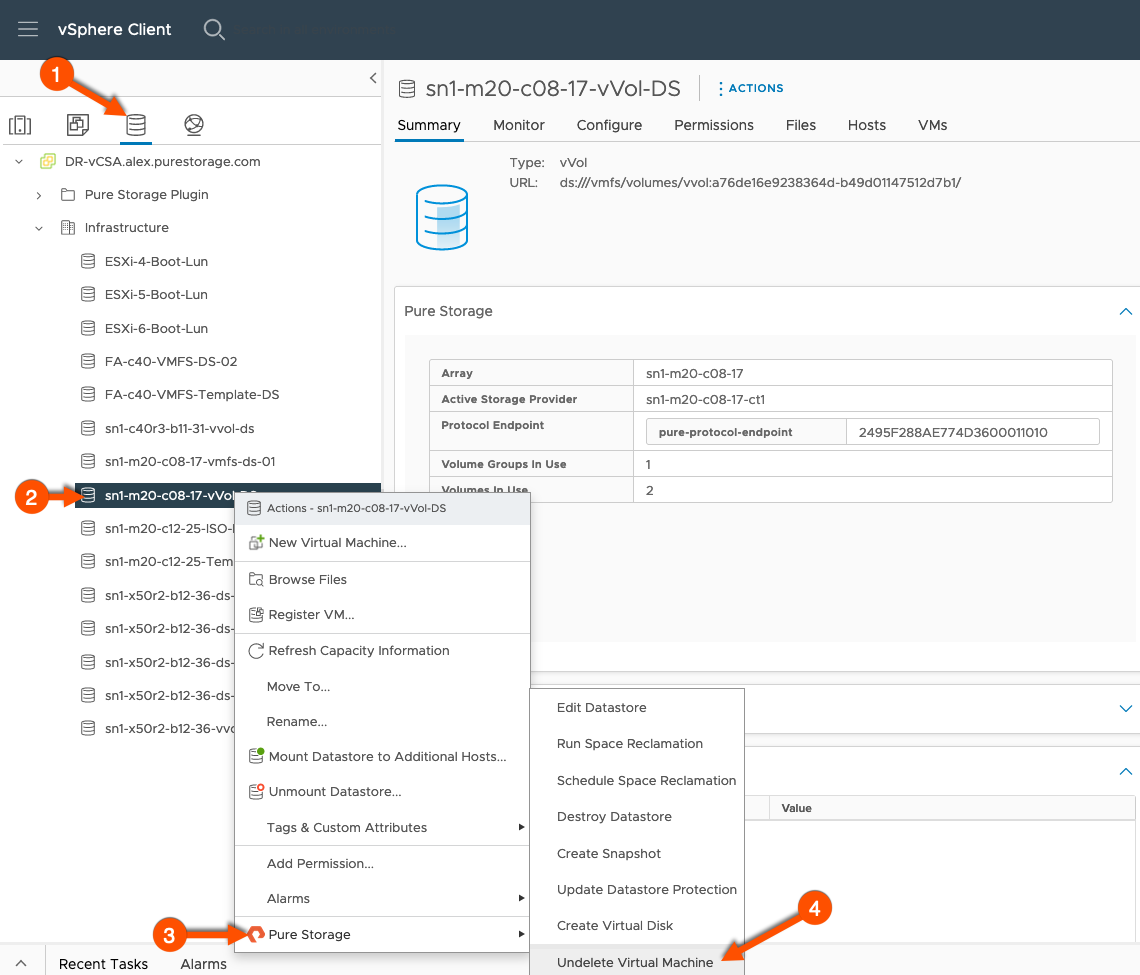
Figure 2: Direct VM recovery via the “Undelete Virtual Machine”—enabled by the Pure Storage vSphere Plugin.
No rebuilds, no pipeline tweaks, no manual mapping, no manual overwrites, no late-night stress.
Final Recovery and Lessons Learned
This customer was in a tough spot. When cost concerns and competing priorities come into play, it’s easy to deprioritize something that feels like “just in case” insurance.
Pure Storage has always advised using Snapshots, but sometimes the value of that “insurance” isn’t realized until disaster hits and you’re stuck footing the bill.
That’s why I’m sharing this now—to highlight just how quickly a “nice-to-have” becomes mission critical.
The good news? FlashArray eradication delay gave us a narrow window to recover. The better news? You don’t need to rely on luck.
Key Takeaways
- Enable Snapshots
- Use the plugin
- Use SPBM to enable default vVols datastore protection—at a minimum
- Consolidate recovery tasks with Pure Fusion
Because next time, the eradication timer might expire.
And here’s the kicker:
This recovery was only possible because of FlashArray and the vVols architecture. And yet, VMware is deprecating vVols… pushing us back to VMDKs and RDMs.
Want to Help Stop This Madness? Contact VMware
Tell them you still want full vVol support. Because without it, recoveries like this one won’t be possible next time.
Editor’s Note: VMware vVols End-of-life Update (Dec 2025)
VMware has announced the deprecation and end-of-life (EOL) of vSphere Virtual Volumes (vVols):
- vVols remain supported only through VMware vSphere 8.0 and VMware Cloud Foundation (VCF) 9.0. Support for these versions will end between 2027-2028.
- No new feature development for vVols is planned; only limited support is available from VMware until EOL.
- Official retirement will occur with VCF 9.1 (expected 2028); vVols will not be supported in any new VMware releases after that point.
If you are currently using vVols: Pure Storage recommends that you begin planning your migration to supported VMware storage solutions (such as VMFS or NFS) well before EOL. For current integration and migration resources, up-to-date documentation, or personalized help, please visit our technical support portal or contact your Pure Storage representative. This blog post is for historical and archival purposes only. Do not use as guidance for new deployments. For current storage integration options and migration toolkits, refer to our latest migration guides and platform resources.